

**Note** This guide is virtually identical to the debricking guide for the WNR3500L (v1) with some minor changes. For more information, see our guides for debricking the WNR3500L on Ubuntu and Mac, as well as a Linux/minicom specific guide for the v2.
So you've gone and done it... you've bricked your WNR3500Lv2. Nothing sinks the spirits like constantly flashing lights and endless reboot loops. However, don't lose hope or get frustrated - there's a solution to your woes, and it's called a serial console.
Before you think that this is too complicated for you, read on. It's actually quite simple, but there are several steps involved that require completion exactly as stated. Remember, you perform these steps at your own risk, but rest assured that I have followed these exact steps to great success and that you should be able to duplicate them. The instructions that follow are for use on Windows systems.
Materials Needed

- 1x Bricked WNR3500Lv2
- Ethernet cable
- Windows PC/Laptop
- Installed TFTP client (Windows XP, 2000, and 7 have this built in. Otherwise, see step 10 for installation instructions/links)
- Teeny tiny screwdriver or similar implement
- Electrical tape (Optional, but recommended)
- USB-TTL Cable from FTDI. You can purchase one of these from Mouser Electronics. Ensure that you have model TTL-232R-3V3 specifically, or you can fry your router! See photo above.
- Torx T6 or T7 screwdriver
- Thin flathead screwdriver (Optional, but recommended)
- NETGEAR Original Firmware for the WNR3500Lv2 (Download from here and put into your C: drive).
- Patience. Some of these steps may take multiple attempts.
Step 1: Crack Open the Router

Well, don't literally crack it, unless you want a broken router! It's pretty easy to open, but be careful. Use the Torx screwdriver to remove the two screws on the bottom of the unit first.
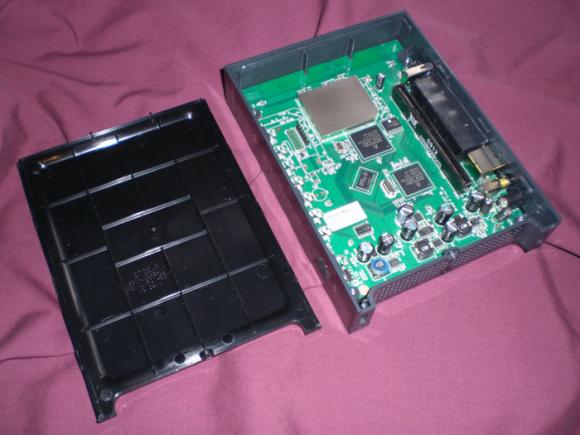
Now, you will have to unsnap the case from the router. In the photo, look closely at the router's casing. You may be able to see the tabs on the left and right side. The panel you need to remove is the "top" panel - look at the back of the router and turn it so the text is right side up. The top panel, when the router is situated this way, is the one you should need to remove. Gently put your screwdriver (preferably flathead) in the seam and disconnect these tabs. Once you are able to slide the case off, put the router aside for now.
Note: The first time removing it, I needed the screwdriver to pry it loose, but on subsequent tries I discovered that the case "slides" and snaps into place. Try various methods to find what works best for you. You may not need an implement to unsnap the tabs at all, if you're lucky!
Step 2: Download PuTTY Program and Install
PuTTY is the nifty, free little program that you will use to program the router, also known as a serial console. Download it from here, and install it using the self-installing executable.
Step 3: Download Cable Drivers and Install
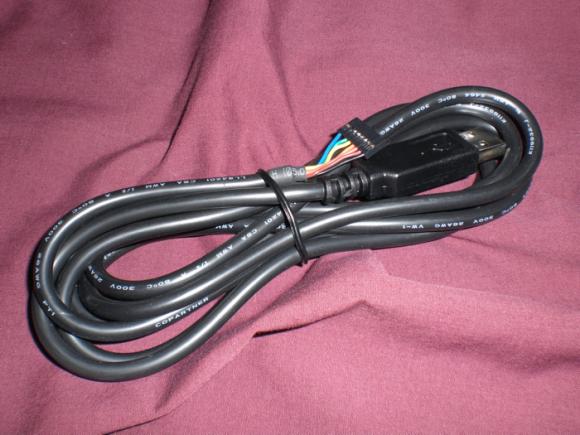
Now, you'll need to download the drivers for your USB-TTL cable. In a nutshell, this cable "converts" the USB interface of your PC to a serial output that the board of the WNR3500L can understand, so you can communicate directly with the board (i.e., not over your network.)
Download the proper driver for Windows from here and install it. A reboot is not required, but recommended.
Step 4: Give your PC a Static IP Address
This step is to ensure that you will be able to communicate with 192.168.1.1, the default address of the bricked router.
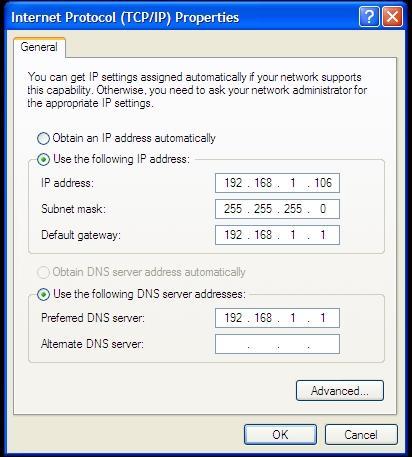
Head to Control Panel => Your Internet Connection => TCP/IP => Properties and change your IP address as shown above. Make sure it does not end in .1, .x1, or .xx1.
Step 5: Plug in Ethernet from Router to PC
Note: Do NOT connect the power to the router just yet.

Connect the Ethernet cable you have in your possession to an orange port on the WNR3500Lv2 to the Ethernet port on your PC. Note that it must be an orange port, NOT the yellow port... it won't work otherwise. At least, it didn't for me.
[[page]]
Step 6: Modify the USB-TTL Cable for Use with WNR3500Lv2
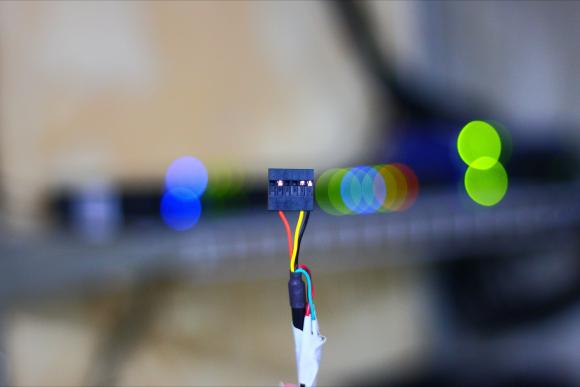
Take a look at the photo above. See how each of the leads is covered by a small plastic tab? Bust out your tiny screwdriver or whatever it is that you have that's tiny, and pry off the tabs on the black, yellow, and orange leads only. If you choose to remove all six, you will need to wrap up the unused leads in electrical tape to avoid shorting anything out. Once you pry the tabs off, the leads that you will be using will slip out easily. Now, you can plug the leads in directly. (Note that you can also do the opposite of this, and leave the proper leads in while removing the others, meaning you can plug the whole harness into the router. Whichever you prefer.)
Step 7: Find Out What COM Port Your Cable is Using
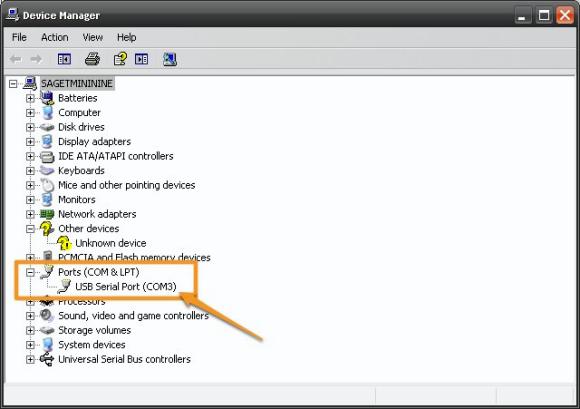
You installed the cable driver in step 3, right? If so, head on over to Control Panel => System => Hardware => Device Manager, and click on the "Ports" item as shown in the photo above. Note the "USB Serial Port" item with a designation of "COM3." You'll use this information in the next steps. If you don't see that, plug in the cable and the Device Manager should refresh.
Step 8: Connect the USB-TTL Cable to the WNR3500Lv2
Note: Make sure the router is still powered off and unplugged from power when you do this. Don't touch anything metal either, don't want to take any risks of shock or shorting anything out, which is always a potential concern when tinkering with open electronics.
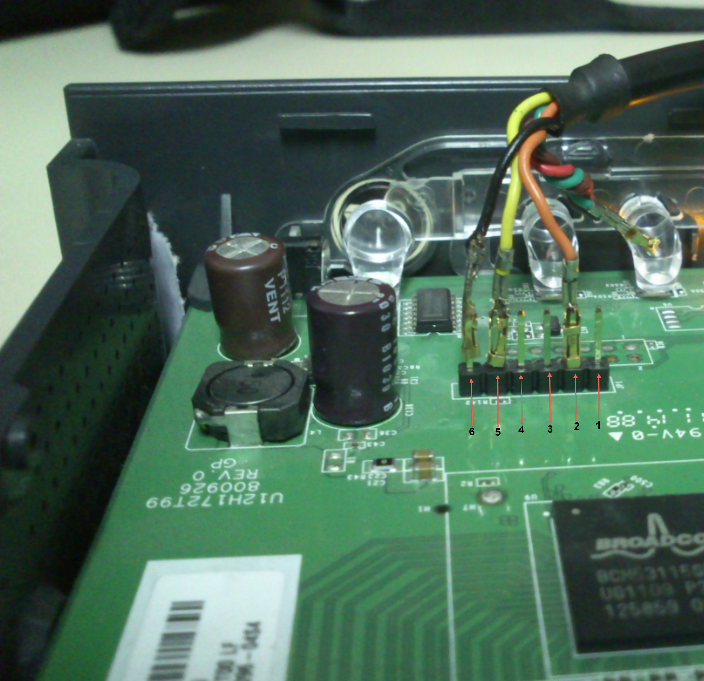
This part is particularly important, as if you don't connect these cables properly it will be very frustrating for you! Take a close look at the photo above. On the pinout on the board, you will see six pins. Next to one pin it will read "JP1." That is actually Pin 6. Pin 1 is labeled with a "1" next to it. Connect the cables as follows and as shown in the photo:
Black => Pin 6 (next to JP1)
Yellow => Pin 5
Orange => Pin 2
Step 9: Configure and Launch PuTTY
Hanging in there? Do you feel like a geek yet? It should feel good :)
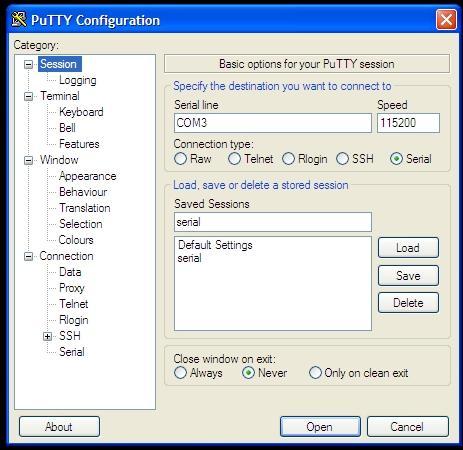
Fire up PuTTY and you'll see the screen above. Select the exact options as shown above; click on the Serial radio button, the port to COM3 (or whatever port was revealed in Step 7) and the speed to 115200.
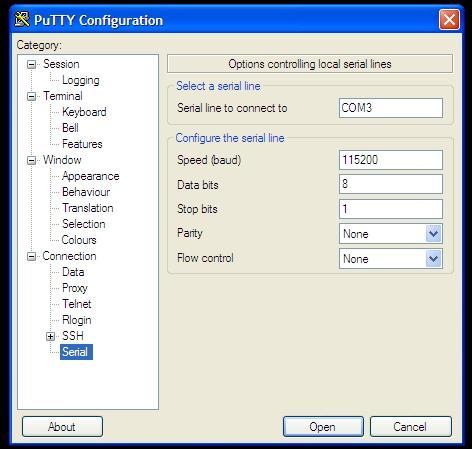
Then, click on the very last item in the menu and choose the options above. They must be exact: serial line of COM3, speed of 115200, Data bits of 8, Stop bits of 1, and "None" for both parity and flow control. Once you are confident these settings are correct, click "Open," and you will see a blank window with a green cursor. Nothing is supposed to be happening in there yet, so don't fret.
Step 9: Power on the WNR3500Lv2 and Press Ctrl-C
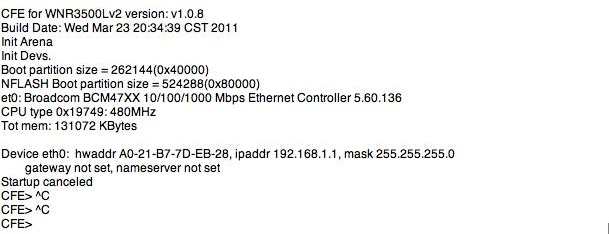
Now, you can finally connect power to the router. Press in the power button and immediately press Ctrl-C on your PC, with the PuTTY window active. This will bring you to what is called the CFE console; essentially, you're interacting directly with the board. If this does not happen, double and triple check all of the previous steps.
 Then, type in "tftpd" (without quotes) to bring up what is called the TFTP interface. This will ready the router for programming. If this step performed properly, you'll be left with the screen above. Almost there...
Step 10: "Put" The Firmware Into Your WNR3500Lv2 In The DOS Prompt
Note: If you are on Windows 2000, XP, or 7, you have a TFTP client built in. (Note that it does have to be enabled, however. Some easy instructions can be found here.) However, if you're on Win95, 98, Me, NT, or Vista - you do not.
Instructions for installing TFTP on Windows Vista can be found here.
Here is one open source TFTP client for Windows that you can try.
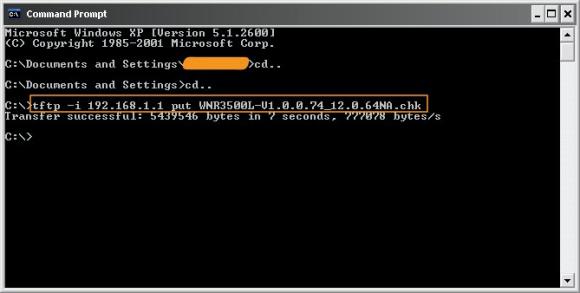
Assuming that you have TFTP installed in some form, zoom on over to your DOS prompt. You copied the original NETGEAR fimware to your C: drive, correct? Good. Type "cd.." without quotes as shown above to get to your root directory, then type this command:
tftp -i 192.168.1.1 put FIRMWARE_FILE.chk
When you do this, the TFTP command will send the firmware file you indicated to the router, and you will get a confirmation as shown above. If this doesn't work, make sure your router is connected to your PC properly, you have a static IP that doesn't end in 1, and that you can ping the router.
If this command is successful, your PuTTY console will start to get some action, and it will re-program the router. Allow this process to finish, it will take several minutes, and wait until it is COMPLETELY finished or you will get a bad flash. And nobody wants a bad flash! You'll get a lot more text than is displayed above, but when it's done, you can try accessing your router's GUI via http://192.168.1.1. You will need to enter the "standard" username and password, consult your user manual for this information. (At the time of this writing, "admin" and "password" were used.)
Step 11: Rejoice and Relax... or troubleshoot
Hopefully, not the latter, but unfortunately things don't always go as planned. If you're struggling with this procedure, have an unsolvable problem with your WNR3500Lv2, or are on another OS let us know.
You can post your questions on the public forums or as a comment below!
Wich .chk did you use? What does it do on, for example, the tomato firmware?
Did you clear the NVRAM, and did you try a full 30/30/30 reset before flashing?
Ok fir
Make a 30/30/30 seconds reset firstly!
Then check if TX and RX cable are well connected, cause you can see the program running but you can not transfert the files .chk
then you have to stay into putty and keep ctrl+c pressed and then (ever keeping ctrl+c) turn on the device, as you should be allowed to stop the startup and make the debrick with a transfert by tftp
You can try to switch RX and TX cable and check again if you can not stop the startup
Was getting stuck - My WNR3500Lv2 don't get past the line "Starting program at 0x80001000".
And no replay on ping.
What can i do?
Tried a few times, but what ended up working was getting another firmware - was trying the Netgear one but went with Tomato and things are working again..
Hey I have a problem with debricking my netgear ..
I only recieve 2 Ping answers, so the tftp methode wasnt working. I bought the right usb/com cable and made everything on the tutorial. I use putty 0.63 an when i turn on my netgear wnr3500lv2 i recieve following messasge: (i do typing ctrl+c all the time but nothing happens)
what is wrong about it ?
Found a Samsung NAND flash with 2048B pages or 128KB blocks; total size 128MB
Decompressing...done
CFE for WNR3500Lv2 version: v1.0.9
Build Date: Fri May 6 11:54:17 CST 2011
Init Arena
Init Devs.
Boot partition size = 262144(0x40000)
NFLASH Boot partition size = 524288(0x80000)
et0: Broadcom BCM47XX 10/100/1000 Mbps Ethernet Controller 5.60.136
CPU type 0x19749: 480MHz
Tot mem: 131072 KBytes
Device eth0: hwaddr 84-1B-5E-EE-99-D2, ipaddr 192.168.1.1, mask 255.255.255.0
gateway not set, nameserver not set
Checking crc...done.
Loader:raw Filesys:raw Dev:flash0.os File: Options:(null)
Loading: ...... 3552764 bytes read
Entry at 0x80001000
Closing network.
Starting program at 0x80001000
Linux version 2.6.22 (max@moonlight) (gcc version 4.2.3) #334 Tue Dec 7 12:57:20 CST 2010
CPU revision is: 00019749
Found a 0MB ST compatible serial flash
early_nvram_get: Failed reading nvram var kernel_args
Determined physical RAM map:
memory: 07fff000 @ 00000000 (usable)
Built 1 zonelists. Total pages: 32512
Kernel command line: root=/dev/mtdblock2 console=ttyS0,115200 init=/sbin/preinit
Primary instruction cache 32kB, physically tagged, 4-way, linesize 32 bytes.
Primary data cache 32kB, 4-way, linesize 32 bytes.
Synthesized TLB refill handler (20 instructions).
Synthesized TLB load handler fastpath (32 instructions).
Synthesized TLB store handler fastpath (32 instructions).
Synthesized TLB modify handler fastpath (31 instructions).
PID hash table entries: 512 (order: 9, 2048 bytes)
CPU: BCM5357 rev 2 at 80 MHz
early_nvram_get: Failed reading nvram var watchdog
Using 40.000 MHz high precision timer.
Dentry cache hash table entries: 16384 (order: 4, 65536 bytes)
Inode-cache hash table entries: 8192 (order: 3, 32768 bytes)
Memory: 126136k/131068k available (2921k kernel code, 4772k reserved, 426k data, 120k init, 0k highmem)
Mount-cache hash table entries: 512
NET: Registered protocol family 16
SCSI subsystem initialized
PCI: no core
early_nvram_get: Failed reading nvram var sb/1/devid
early_nvram_get: Failed reading nvram var devid
early_nvram_get: Failed reading nvram var wl0id
PCI: Fixing up bus 0
Time: MIPS clocksource has been installed.
NET: Registered protocol family 2
IP route cache hash table entries: 1024 (order: 0, 4096 bytes)
TCP established hash table entries: 4096 (order: 3, 32768 bytes)
TCP bind hash table entries: 4096 (order: 2, 16384 bytes)
TCP: Hash tables configured (established 4096 bind 4096)
TCP reno registered
squashfs: version 3.4 (2008/08/26) Phillip Lougher
squashfs: LZMA suppport for slax.org by jro
fuse init (API version 7.8)
io scheduler noop registered
io scheduler deadline registered (default)
Serial: 8250/16550 driver $Revision: 1.1.1.1 $ 4 ports, IRQ sharing disabled
serial8250: ttyS0 at MMIO 0x0 (irq = 8) is a 16550A
loop: module loaded
PPP generic driver version 2.4.2
NET: Registered protocol family 24
PPPoL2TP kernel driver, V0.17
pflash: found no supported devices
sflash: found no supported devices
u32 classifier
TCP cubic registered
NET: Registered protocol family 1
NET: Registered protocol family 10
6WIND/LSIIT IPv6 multicast forwarding 0.1 plus PIM-SM/SSM with *BSD API
lo: Disabled Privacy Extensions
IPv6 over IPv4 tunneling driver
sit0: Disabled Privacy Extensions
NET: Registered protocol family 17
802.1Q VLAN Support v1.8 Ben Greear
All bugs added by David S. Miller
VFS: Cannot open root device "mtdblock2" or unknown-block(0,0)
Please append a correct "root=" boot option; here are the available partitions:
Kernel panic - not syncing: VFS: Unable to mount root fs on unknown-block(0,0)
Found a Samsung NAND flash with 2048B pages or 128KB blocks; total size 128MB
Decompressing...done
CFE for WNR3500Lv2 version: v1.0.9
Build Date: Fri May 6 11:54:17 CST 2011
Init Arena
Init Devs.
Boot partition size = 262144(0x40000)
NFLASH Boot partition size = 524288(0x80000)
et0: Broadcom BCM47XX 10/100/1000 Mbps Ethernet Controller 5.60.136
CPU type 0x19749: 480MHz
Tot mem: 131072 KBytes
Device eth0: hwaddr 84-1B-5E-EE-99-D2, ipaddr 192.168.1.1, mask 255.255.255.0
gateway not set, nameserver not set
Checking crc...done.
Loader:raw Filesys:raw Dev:flash0.os File: Options:(null)
Loading: ...... 3552764 bytes read
Entry at 0x80001000
Closing network.
Starting program at 0x80001000
Linux version 2.6.22 (max@moonlight) (gcc version 4.2.3) #334 Tue Dec 7 12:57:20 CST 2010
CPU revision is: 00019749
Found a 0MB ST compatible serial flash
early_nvram_get: Failed reading nvram var kernel_args
Determined physical RAM map:
memory: 07fff000 @ 00000000 (usable)
Built 1 zonelists. Total pages: 32512
Kernel command line: root=/dev/mtdblock2 console=ttyS0,115200 init=/sbin/preinit
Primary instruction cache 32kB, physically tagged, 4-way, linesize 32 bytes.
Primary data cache 32kB, 4-way, linesize 32 bytes.
Synthesized TLB refill handler (20 instructions).
Synthesized TLB load handler fastpath (32 instructions).
Synthesized TLB store handler fastpath (32 instructions).
Synthesized TLB modify handler fastpath (31 instructions).
PID hash table entries: 512 (order: 9, 2048 bytes)
CPU: BCM5357 rev 2 at 80 MHz
early_nvram_get: Failed reading nvram var watchdog
Using 40.000 MHz high precision timer.
Dentry cache hash table entries: 16384 (order: 4, 65536 bytes)
Inode-cache hash table entries: 8192 (order: 3, 32768 bytes)
Memory: 126136k/131068k available (2921k kernel code, 4772k reserved, 426k data, 120k init, 0k highmem)
Mount-cache hash table entries: 512
NET: Registered protocol family 16
SCSI subsystem initialized
PCI: no core
early_nvram_get: Failed reading nvram var sb/1/devid
early_nvram_get: Failed reading nvram var devid
early_nvram_get: Failed reading nvram var wl0id
PCI: Fixing up bus 0
Time: MIPS clocksource has been installed.
NET: Registered protocol family 2
IP route cache hash table entries: 1024 (order: 0, 4096 bytes)
TCP established hash table entries: 4096 (order: 3, 32768 bytes)
TCP bind hash table entries: 4096 (order: 2, 16384 bytes)
TCP: Hash tables configured (established 4096 bind 4096)
TCP reno registered
squashfs: version 3.4 (2008/08/26) Phillip Lougher
squashfs: LZMA suppport for slax.org by jro
fuse init (API version 7.8)
io scheduler noop registered
io scheduler deadline registered (default)
Serial: 8250/16550 driver $Revision: 1.1.1.1 $ 4 ports, IRQ sharing disabled
serial8250: ttyS0 at MMIO 0x0 (irq = 8) is a 16550A
loop: module loaded
PPP generic driver version 2.4.2
NET: Registered protocol family 24
PPPoL2TP kernel driver, V0.17
pflash: found no supported devices
sflash: found no supported devices
u32 classifier
TCP cubic registered
NET: Registered protocol family 1
NET: Registered protocol family 10
6WIND/LSIIT IPv6 multicast forwarding 0.1 plus PIM-SM/SSM with *BSD API
lo: Disabled Privacy Extensions
IPv6 over IPv4 tunneling driver
sit0: Disabled Privacy Extensions
NET: Registered protocol family 17
802.1Q VLAN Support v1.8 Ben Greear
All bugs added by David S. Miller
VFS: Cannot open root device "mtdblock2" or unknown-block(0,0)
Please append a correct "root=" boot option; here are the available partitions:
Kernel panic - not syncing: VFS: Unable to mount root fs on unknown-block(0,0)
Found a Samsung NAND flash with 2048B pages or 128KB blocks; total size 128MB
Decompressing...done
CFE for WNR3500Lv2 version: v1.0.9
Build Date: Fri May 6 11:54:17 CST 2011
Init Arena
Init Devs.
Boot partition size = 262144(0x40000)
NFLASH Boot partition size = 524288(0x80000)
et0: Broadcom BCM47XX 10/100/1000 Mbps Ethernet Controller 5.60.136
CPU type 0x19749: 480MHz
Tot mem: 131072 KBytes
Device eth0: hwaddr 84-1B-5E-EE-99-D2, ipaddr 192.168.1.1, mask 255.255.255.0
gateway not set, nameserver not set
Checking crc...done.
Loader:raw Filesys:raw Dev:flash0.os File: Options:(null)
Loading: ...... 3552764 bytes read
Entry at 0x80001000
Closing network.
Starting program at 0x80001000
Linux version 2.6.22 (max@moonlight) (gcc version 4.2.3) #334 Tue Dec 7 12:57:20 CST 2010
CPU revision is: 00019749
Found a 0MB ST compatible serial flash
early_nvram_get: Failed reading nvram var kernel_args
Determined physical RAM map:
memory: 07fff000 @ 00000000 (usable)
Built 1 zonelists. Total pages: 32512
Kernel command line: root=/dev/mtdblock2 console=ttyS0,115200 init=/sbin/preinit
Primary instruction cache 32kB, physically tagged, 4-way, linesize 32 bytes.
Primary data cache 32kB, 4-way, linesize 32 bytes.
Synthesized TLB refill handler (20 instructions).
Synthesized TLB load handler fastpath (32 instructions).
Synthesized TLB store handler fastpath (32 instructions).
Synthesized TLB modify handler fastpath (31 instructions).
PID hash table entries: 512 (order: 9, 2048 bytes)
CPU: BCM5357 rev 2 at 80 MHz
early_nvram_get: Failed reading nvram var watchdog
Using 40.000 MHz high precision timer.
Dentry cache hash table entries: 16384 (order: 4, 65536 bytes)
Inode-cache hash table entries: 8192 (order: 3, 32768 bytes)
Memory: 126136k/131068k available (2921k kernel code, 4772k reserved, 426k data, 120k init, 0k highmem)
Mount-cache hash table entries: 512
NET: Registered protocol family 16
SCSI subsystem initialized
PCI: no core
early_nvram_get: Failed reading nvram var sb/1/devid
early_nvram_get: Failed reading nvram var devid
early_nvram_get: Failed reading nvram var wl0id
PCI: Fixing up bus 0
Time: MIPS clocksource has been installed.
NET: Registered protocol family 2
IP route cache hash table entries: 1024 (order: 0, 4096 bytes)
TCP established hash table entries: 4096 (order: 3, 32768 bytes)
TCP bind hash table entries: 4096 (order: 2, 16384 bytes)
TCP: Hash tables configured (established 4096 bind 4096)
TCP reno registered
squashfs: version 3.4 (2008/08/26) Phillip Lougher
squashfs: LZMA suppport for slax.org by jro
fuse init (API version 7.8)
io scheduler noop registered
io scheduler deadline registered (default)
Serial: 8250/16550 driver $Revision: 1.1.1.1 $ 4 ports, IRQ sharing disabled
serial8250: ttyS0 at MMIO 0x0 (irq = 8) is a 16550A
loop: module loaded
PPP generic driver version 2.4.2
NET: Registered protocol family 24
PPPoL2TP kernel driver, V0.17
pflash: found no supported devices
sflash: found no supported devices
u32 classifier
TCP cubic registered
NET: Registered protocol family 1
NET: Registered protocol family 10
6WIND/LSIIT IPv6 multicast forwarding 0.1 plus PIM-SM/SSM with *BSD API
lo: Disabled Privacy Extensions
IPv6 over IPv4 tunneling driver
sit0: Disabled Privacy Extensions
NET: Registered protocol family 17
802.1Q VLAN Support v1.8 Ben Greear
All bugs added by David S. Miller
VFS: Cannot open root device "mtdblock2" or unknown-block(0,0)
Please append a correct "root=" boot option; here are the available partitions:
Kernel panic - not syncing: VFS: Unable to mount root fs on unknown-block(0,0)
Hello,
I cant get this to work, all I get displayed on putty is random numbers and letters. Do you have any idea why this is?
Reason for trying to debrick is because I uploaded a 3500L firmware into my lv2.
Hi,
i've two broken devices. the first one was fixed and on in ten minutes... the second one won't boot and show the output in the putty window. i've no idea - resatrted the pc, changed rx / tx and also tryed with and without ground.
any idea?
Hello...
I have a R6250 that I do not know the history of..
After testing it out, I see that it will light up, flash several pretty icon lights, and finally sit there blinking it's green POWER ON light.
Suspecting it to be bricked, I followed the de-bricking guide.
I even got:
Start TFTP server
Reading::
My problem is that I am still not able to establish an Ethernet connection with the R6250
My IP is fixed at 192.168.1.12 (255.255.255.0)
when I ping 192.168.1.1 I get:
C:\Users\gnu_B>ping 192.168.1.1
Pinging 192.168.1.1 with 32 bytes of data:
Request timed out.
Request timed out.
Request timed out.
When I looked more closely at the messages from the r6250, I noticed these lines:
Checking crc...Boot program checksum is invalid
Device eth0 has been deactivated.
So, it looks like I need to find another way to load new firmware.
I see that Tera Term has Send File... command.
Should that be my next move???
I think that I'm pretty close to success and I don't want to mangle the R6250.
Please advise,
-gnu_B
Hi,
after the flash of last shibby version tomato-Netgear-3500Lv2-K26USB-1.28.RT-N5xâ??124-AIO.chk from previous 105-AIO my router is dead.
I tried also many times to do 30-30-30, but no clue.
I've a loop on CFE (router start directly writing and looping on the follows, and i can't stop it with CTRL+C):
CFE for WNR3500Lv2 version: v1.0.9
Build Date: Fri May 6 11:54:17 CST 2011
Init Arena
Init Devs.
Boot partition size = 262144(0x40000)
NFLASH Boot partition size = 524288(0x80000)
Found a Samsung NAND flash with 2048B pages or 128KB blocks; total size 128MB
Decompressing...done
CFE for WNR3500Lv2 version: v1.0.9
Build Date: Fri May 6 11:54:17 CST 2011
Init Arena
Init Devs.
Boot partition size = 262144(0x40000)
NFLASH Boot partition size = 524288(0x80000)
Found a Samsung NAND flash with 2048B pages or 128KB blocks; total size 128MB
Decompressing...done
CFE for WNR3500Lv2 version: v1.0.9
Build Date: Fri May 6 11:54:17 CST 2011
Init Arena
Init Devs.
Boot partition size = 262144(0x40000)
NFLASH Boot partition size = 524288(0x80000)
Found a Samsung NAND flash with 2048B pages or 128KB blocks; total size 128MB
Decompressing...done
and after a while loop as:
Found a Samsung NAND flash with 2048B pages or 128KB blocks; total size 128MB
Decompressing...done
Found a Samsung NAND flash with 2048B pages or 128KB blocks; total size 128MB
Decompressing...done
Found a Samsung NAND flash with 2048B pages or 128KB blocks; total size 128MB
Decompressing...done
Found a Samsung NAND flash with 2048B pages or 128KB blocks; total size 128MB
Decompressing...done
I'm connected with ttl-com rx-tx-gnd on router board. seem that the cfe cannot start.
If this is the problem, there is some possibility to break in to CFE or to reflash? and how?
if i connected in erong manner please let me know.
Thank you in advance for you help.
A
Hi adrenas,
I too couldn't seem to get Ctrl-C to wrk initially - the CFE screen kept looping.
I just kept on Ctrl-Cing and finally it dumped me to the prompt
Thank you so much for this guide - the commecnts underneath were just as useful;
Swapping over the Tx and Rx pins worked for me - router now back up and running.
I pulled this off using an Arduino Uno. The built in FTDI chip was sufficient to do this. I ended up doing it twice on a WNR-3500L V2.
Pin 6 > Ground
Pin 5 > TX
Pin 2 > RX
I used pieces of wire to connect the pins from the Arduino Uno to an IDE cable and then attached the other end to the router.
If anyone has these parts and does not feel like dropping the money on a cable they probably will never use again, then feel free to use this method as it is entirely safe!
Peter
Many thanks for this very helpful page. It's encouraged me that there is hope in unbricking my WNDR4500v2. This didn't accept the initial flash of dd-wrt firmware and I can't communicate with it in any way.
I've assumed that the instructions you've set out above are basically the same for my router. Connected up the serial cable (using subhra's instructions for how to wire a serial cable for the WNDR4500v2). Hooked up the ethernet and established a static IP as you say above.
Now I start the router and try to hit Ctl C as described. However I'm not getting a connection. Typically what I see is a single letter appearing each time I connect, and this gradually spells out NON GENUINE PARTS DETECTED!
I have checked and rechecked my Putty settings and they are exactly as described. I've carefully examined the manufacturers cable description (mine is a Cable USB TTL 3V3 Connecteur Compatible FTDI - Arduino, made by EB Connections) and identified the ground (Black), TX (White) and RX (Yellow), so I have a slightly different cable from the one you have used. The drivers are installed and device manager says the cable is working correctly.
As suggested above, I tried swapping over the TX and RX but that got me nowhere - just the same NON GENUINE PARTS DETECTED! message. Also tried disconnecting the ground cable but that brought me no joy either.
The router itself is doing very little on start-up. The power light comes on amber and stays there (it should go to green after about a minute). The LAN port indicator light shows green on the port the ethernet cable is plugged into). There is no TCP'IP connection to the router.
Any ideas?
Many thanks,
R
I experienced some problems due to my FTDI cable 3.3v having a different pin layout in the tab. My cable is for programming raspberry and therefore I used the black cable as GND at position 1 (marked with a triangular) Yellow TXD on position 5 and Orange RXD at position 4. But no luck with flashing... On another site I found that before starting TFTP you better do an "NVRAM erase" and "NVRAM commit". Performing the "NVRAM commit" resulted that after succesfull flashing, the reboot of the router always hanged after it executed an automatic NVRAM commit it performed. Interrupting it again and just giving "NVRAM erase" performed a perfect boot and a working router. Just for your information, if you would experience the same issues.
Hi all,
I found a cheap TTL-232R-3V3-WE instead of a TTL-232R-3V3, it seems that the only difference is that the WE doesn't have a connector, it has just a series of wires at the end, can I buy this cable?
I used JBtek cable https://www.amazon.com/gp/product/B00QT7LQ88/ref=oh_aui_detailpage_o02_s00?ie=UTF8&psc=1 and also pinout guide from http://www.cesareriva.com/netgear-wnr3500l-v2-debrick/ .
Initially I had problems getting into the CFE console, stalling at "Starting program at 0x80001000" but found I wasn't timing Ctrl-C correctly.
This guide was indispensable in getting me up and running again.
Many Thanks!
Hello everyone reading this.
I must say that this is a very good guide but I am at a loss.
I have managed to set up a serial reader and getting action in putty, but it is unreadable (screenshot below)
It looks and acts like booting messages. Putty settings are as in this guide.
A normal boot gives a an amber powerlight, putty action, no ping except for a single second at boot, and a connected LAN port lights up.
I am unable to get the ctrl+c going but I am able to get the TFTP going by shorting the pins as in this guide:
http://blog.zipleen.com/2011/04/how-to-debrick-netgear-wnr3500l.html
If shorted, ping works, I am able to transfer files, and putty gives a short reaction each time a file is transferred.
More than 10 min has passed each time after a file transfer before I have reseted the router.
The firmwares I have used are:
DD-WRT Webflash CHK
Tomato chk
Netgear original chk
If I hold the reset button while powering the router, the majority of messages in putty holds, until the reset button is released.
It seems like the router has some sort of functionality but something is not right.
Hope the community can help.
Thanks in advance.
Hello and thanks much for the guide. I have one request, can the guide be edited to correct the JP1 description. As soneone pointed out earlier, the text (which appears to be for a wnr3500v1) incorrectly lists the orientation of JP1. Pin 1 of JP1 is next to the JP1 label. Even in the picture, it does not match the text. Only the brave few who read the comments may get it right the first time.
Again, thanks for the guide.
An additional note, the cable I received had 2 yellow wires. Somewhere between swapping the wires (a couple of times) to get past the faint glow power light issue, the router completely bricked (will no longer respond to a few pings after reset button power on). I should have done more research I guess.
I want to say thanks for this post. I had a couple of bumps but it was more than enough information for be to be successful is debricking and I am using the rougher now. About an hour total for the complete process.
THANK YOU!!!
Hi, My Router has get a wrong firmware update
(R7000-back-to-ofw.trx) and Its not possible to upload the original firmware.
Its a Netgear R8000. I followed the steps in this description at this site.
The Serial connection with the USB-TTL Cable works fine.
My problem is that when I canceled the startup and I am in the CFE console, I can NOT Ping the router in the command promt Window.
I tried before and after I started the TFTP server in the CFE console.
I tried all Ethernet ports (1-4) no succsess
But if I let the router starting up, I can ping the router with the adress 192.168.1.1
Does anyone know a solution for this problem ?
Kind regards, Daniel
Hello, I have a bricked Netgear R8000, which got the wrong firmware.
I can establish the connection with the USB-TTL cable and put the device in tftpd mode, but then I cannot establish a connection via LAN port (ping fails).
If I restart the router and don't interrupt it, I can ping the router.
But In this state I can not upload the firmware.
Does anyone know a solution to this problem?
Kind regards, Daniel
Pages